Registration of Your Business;

  • Exposes you to opportunities such as easy access to credit to grow your business
  • Protects your business Brand name
  • Makes your business standout in public as a reliable and legitimate entity
  • Gives you an opportunity to vie for Tenders/Bids
  • Exposes your business to larger market opportunities such as the International Market
  • Helps your business to gain recognition from Network Organizations
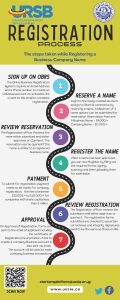
  1. Log into your account
  2. Click “Start” from the left side menu
  3. Click “Register/Apply Business Name”
  4. Identify a reserved name to be registered from the pop-up window
  5. Click the “Register” button alongside the identified reserved name
  6. Enter the particulars of the business name (date of commencement, business address, official contacts, and partner details)
  7. Check box to agree to the statutory declaration
  8. Click the “Save and Continue” button to proceed to the next step
  9. For a Limited Liability Partnership, enter particulars of the Liability in form 6
  10. Preview the details captured in the forms included in the application
  11. Download, Sign and Upload forms included in the application
  12. Add other required attachments
  13. Click “Save and Continue” to submit the application

Registration Process

  1. Log into your account
  2. Click “Start” from the left side menu
  3. Click “Incorporate Company”
  4. Identify a reserved name to be incorporated as a company from the pop-up window
  5. Click the “Register” button alongside the identified reserved name
  6. Check box against optional forms to be submitted together with the mandatory forms in the application
  7. Click the “Continue” button to proceed to the next page
  8. Enter particulars of Form S18 (company physical address, proposed share capital and subscribers of the company)
  9. Enter particulars of Form A1 (total number of shares, share classification and respective value)
  10. Enter particulars of the Memorandum and Articles of Association
  11. Enter particulars of any other selected option form
  12. Enter particulars of directors in Form 20
  13. Enter “Official Company Contact Details”
  14. Preview the details captured in the forms included in the application
  15. Download, Sign and Upload forms included in the application
  16. Add other required attachments
  17. Make “Payment” and “Submit” application for processing by URSB

Registration Process

URSB Offices

Posta Uganda Main office,
Kampala Road Booth 2 & 3.

Plot 3, Park Crescent.
Ministry of Justice and Constitutional Affairs Building

Plot 1, Kamukuzi Hill
Ministry of Justice and Constitutional Affairs Building

Plot 6B Princess Road
Ministry of Justice and Constitutional Affairs Building

Plot 42/44 Packwach road
Ministry of Justice and Constitutional Affairs Building

Bujumbura West,
Next to Hoima Diocese Offices